
This guide explains The Campaign Registry (TCR) from start to finish: what it is, who must register, how registration works through Textr Team, what it costs, and what to do if your application is rejected.
What Is The Campaign Registry (TCR)?
The Campaign Registry (TCR) is the central registration hub for business text messaging in the United States. Campaign Service Providers (CSPs) like Textr Team register their clients' brands and the campaigns linked to those brands in TCR. So businesses can message through the sanctioned 10-digit long code (10DLC) network.

TCR works with mobile operators and messaging companies to register non-consumer (business) text messaging campaigns. Because brand and campaign data lives in one registry, carriers have transparency into who sends each 10DLC message and what they claim to be sending. This helps carriers deliver a more dependable messaging service and keeps spam and fraud out of US texting.
What Is 10DLC?
10DLC stands for 10-digit long code, a standard US phone number in the familiar (555) 123-4567 format. It is the carrier-sanctioned channel for business SMS in the US. A 10DLC number supports both commercial SMS/MMS and voice calls on the same number.
Key Players in the TCR Ecosystem
| Role | Definition |
|---|---|
| Brand | The company or entity the end user believes to be sending the message — your business. |
| CSP (Campaign Service Provider) | The primary user of TCR. A CSP works with multiple Brands to create and launch SMS campaigns. Textr Team is a CSP. |
| DCA (Direct Connect Aggregator) | A company with a direct connection to an MNO gateway that transmits messages on behalf of its customers. |
| MNO (Mobile Network Operator) | Carriers such as AT&T and T-Mobile that deliver your messages. |
| Reseller | An entity (typically another messaging platform) between a CSP and the Brand: Brand → Reseller → CSP. |
Who Reviews and Approves Your Registration?
Three parties are involved, and it matters who does what:
- Brand verification — done by TCR. After you submit, TCR automatically validates your EIN/Tax ID, legal company name, and address against third-party independent sources, and returns a Verified or Unverified status.
- Campaign approval — NOT done by TCR. TCR's official position: "The Campaign Registry (TCR) does not review, approve, or reject campaigns. This is solely done by the CSPs and their upstream connection partners." In practice, your campaign is reviewed by upstream connection partners (CNP/DCA) and the mobile carriers.
- Textr Team — does not review or approve. Textr Team's role is limited to collecting your information, submitting it to TCR, and notifying you of the result. Textr Team has no control over the approval outcome.
Who Must Register with TCR?
If you use US 10DLC numbers to send SMS or MMS messages in bulk (A2P, application-to-person messaging) to customers, you must register your brand and campaigns through Textr Team before you send.
If you do not register:
- MNOs can fine you or block your numbers.
- Unregistered traffic is filtered more aggressively, so your messages are more likely to be flagged as spam.
Special situations:
- Sole proprietors (no EIN/Tax ID): TCR excludes Sole Proprietors from the EIN requirement. Limits apply: one campaign per brand, with a maximum of 1 phone number, and sending caps of 1,000 messages/day (T-Mobile) and 15 messages/minute (AT&T).
- Businesses without a US/Canada presence: Registering a US company is one option. See Registering a US company.
- Toll-free numbers: Toll-free SMS follows separate verification rules. See Register a Toll-Free SMS Campaign.
Textr Team's Role
Textr Team is a Campaign Service Provider (CSP) in the TCR ecosystem — not a carrier, not an MNO, and not the reviewer of your registration. Textr Team acts as the intermediary between you and TCR:
- Submits and manages all your brand and campaign registrations — you never need to contact TCR yourself
- Notifies you of registration results and status updates
- Deducts TCR/MNO fees from your Textr Team account balance and passes them through at cost — no markup, no service fee
- Keeps you informed of changes to registration, fees, or new regulations
- Can appeal to carriers on your behalf if a special use case campaign is rejected in error
What Textr Team does not do: review, approve, or reject your registration, or control the outcome. Approval decisions rest with TCR (brand verification), upstream connection partners, and mobile carriers (campaign approval).
Why Register: 4 Key Benefits
1. Improved Deliverability
Since legislation regulating business messaging passed, MNOs filter aggressively for potential spam and fraud. TCR registration pre-screens your business and your message content: carriers already have a record of who you are and what you send, which lowers the chance of your messages being flagged or blocked and increases the likelihood your customers receive them.
2. Greater Trust and Security
TCR exists to deliver legitimate campaigns and eliminate spam and fraud, so your recipients only receive messages that have been screened and approved. Registration shows customers you are not a fraud, spammer, or robo-texter — and builds confidence in your brand.
3. Higher Throughput
Registered businesses get higher throughput than unregistered senders. Your actual throughput is determined by two things: who is sending (your Brand and its vetting status) and what is being sent (your campaign use case).
To increase throughput: complete brand vetting, declare the right use case, and provide detailed campaign explanations.
Note: adding more phone numbers to a campaign does not increase throughput.
4. Avoid Penalties
Registration helps you avoid unnecessary penalties and fines. Carriers monitor unregistered numbers more closely; with a registration, they already know what you are texting and why. If you skip registration, your numbers may be banned or fined when you violate regulations.
How TCR Registration Works on Textr Team
You register and manage everything inside your Textr Team account.
The flow:
- Create your account and add credits. All TCR fees are deducted from your Textr Team account balance.
- Register your brand. Provide your legal company name, EIN/Tax ID (Sole Proprietors excluded), address, and brand contact details. Your information must match your official business registration exactly.
- Register your campaign. Select your use case, write a clear campaign description, provide sample messages in English, and set the campaign attributes (opt-in, opt-out, help, etc.).
- Wait for approval. Your campaign is reviewed by Textr Team and upstream partners — not by TCR itself. With complete, compliant information, the full process typically takes about 14 business days.
- Assign numbers and start sending. After your campaign is approved, assign your Textr Team phone numbers to it. You can send only after the assigned numbers pass carrier review.
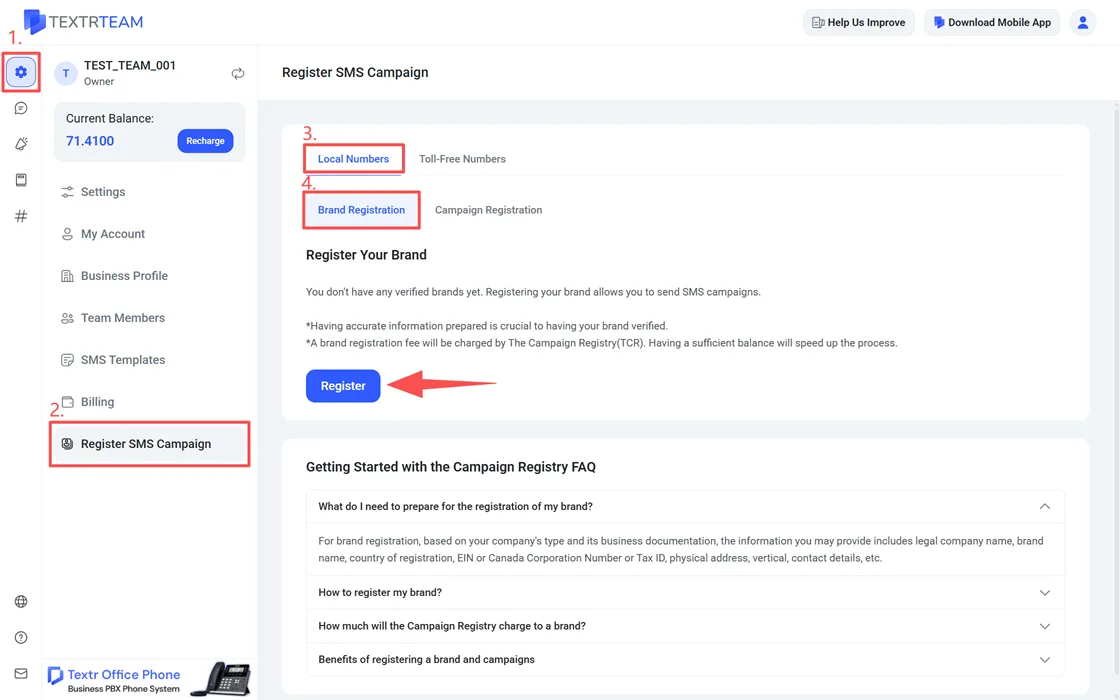
Web path: Settings > Register SMS Campaign > Local Numbers. Here you will find Brand Registration and Campaign Registration.
Key rules:
- Your brand must pass verification before you can register a campaign.
- One brand can hold multiple campaigns.
- Each campaign needs at least one assigned number before you can send.
For step-by-step instructions, see How to Register a Brand and Campaign with TCR and The Complete Process of Registering a Campaign on TCR.
Standard vs. Special Use Cases
| Type | What to know |
|---|---|
| Standard campaigns | Generally available to TCR-registered brands. No MNO pre/post-registration approval needed. |
| Special campaigns | Sensitive or critical in nature (e.g., Political, Social, Sweepstakes, Charity). May require MNO pre/post-registration approval; some carriers require brand vetting first. |
Two more official rules:
- Sub-use cases: Carriers require sub-use cases for certain special use cases, for granularity. For example, a Charity campaign must declare 2-5 specific sub-use cases (such as marketing, account notifications, customer service).
- Agent & Franchise: This use case is for brands with many independent agents or franchisees under a corporate parent. It must be requested by the brand's corporate office — not by individual franchisees or agents.
Brand Vetting
Brand vetting is a deeper review of your brand performed by TCR's external vetting partners. The result is a 0-100 score; higher scores place your brand in better carrier tiers, and vetted brands can access all standard use cases.
Vetting is optional for standard use cases, but:
- Some carriers require vetting or MNO approval for special use cases (official)
- It is the official recommended way to get higher throughput
- If your brand was already vetted through another CSP, ask that provider for your vetting token and import it into your Textr Team registration — you do not need to pay for vetting twice (official)
Fees (charged by TCR's external partners): Standard Brand Vetting $41.50, Enhanced Vet $101.50, Appeal Fee $11. Full details in How Much Will It Cost for the Registration.
What Does TCR Registration Cost?
All fees are determined and charged by TCR/MNOs, deducted from your Textr Team account balance with no markup:
| Fee | Amount | Notes |
|---|---|---|
| Brand registration | $4.00 (Sole Proprietor) / $4.50 (other entity types) | Charged for every submission — initial applications, resubmissions, and information changes. Non-refundable |
| Campaign Vetting Fee | $15.00 per campaign | One-time. Applies to every new campaign registration since January 2023 |
| Campaign monthly fee | $1.50-$10.00 per month | Depends on your use case type |
| Third-party vetting (optional) | $41.50 Standard / $101.50 Enhanced / $11 Appeal | Charged by TCR's external partners |
For the full fee breakdown and cancellation rules, see How Much Will It Cost for the Registration.
Note: since March 1, 2023, T-Mobile charges a $250 non-use fee for inactive campaigns — bind your Textr Team numbers within 60 days to avoid it.
What If Your Registration Is Rejected?
Rejections are fixable.
- Brand rejected or "Unverified": Correct your information on the Brand Details page and resubmit — a resubmission fee applies ($4.00/$4.50). Alternatively, complete or import brand vetting.
- Campaign rejected: Textr Team receives the reason and guides you through fixing and resubmitting. Improve your campaign description and sample messages (in English, matching your use case), or register a new campaign with a better-fitting use case.
- Resubmission windows: Brands — resubmit within 30 calendar days; campaigns — resubmit within 60 calendar days. Missing these windows may require you to restart the process.
- Special use case campaign rejected in error: Textr Team can appeal to the carrier on your behalf (Appeal Fee: $11.00).
For code-by-code fixes, see TCR Campaign Registration Rejection Codes and Solutions.
To prevent rejections, see Tips to Get Your Brand and Campaign Registration Approved, How to Get Your SMS Campaign Application Approved by TCR, and the TCR Application Template for SMS Campaign Approval.
If you need help understanding a rejection, email team.support@textrapp.com.
Frequently Asked Questions
For any other questions about TCR registration, contact Textr Team support.